---
title: Bringing your phone number to FreedomPop
description: Bringing phone number to FreedomPop You can port in your existing number from any major wireless carrier in the USA, without charge. You can even convert your landline or VoIP number (such as Google V
---
[Skip to content](https://help.freedompop.com/bringing-your-phone-number-to-freedompop#main-content)
[Contact us](https://help.freedompop.com/kb-tickets/new?hsLang=en)
[![FreedomPop-Logo.png\]](https://help.freedompop.com/hs-fs/hubfs/FreedomPop-Logo.png?height=40&name=FreedomPop-Logo.png)](https://www.freedompop.com/)
Open main navigation
Close main navigation
- [Contact us](https://help.freedompop.com/kb-tickets/new)
- [FreedomPop Help](https://help.freedompop.com/)
[FreedomPop Help](https://help.freedompop.com/?hsLang=en)
How Can We Help You?
- There are no suggestions because the search field is empty.
1. [FreedomPop Help Center](https://help.freedompop.com/?hsLang=en)
2. [Number Transfer](https://help.freedompop.com/number-transfer?hsLang=en)
# Bringing your phone number to FreedomPop
**This information applies to Premium SIM cards**
**Bringing phone number to FreedomPop**
You can port in your existing number from any major wireless carrier in the USA, without charge. You can even convert your landline or VoIP number (such as Google Voice) to FreedomPop.
After you have obtained your FreedomPop Premium SIM, visit [freedompop.com/activate](https://www.freedompop.com/activate) and enter your SIM card ICCID number. Check the box that says "Would you like to port your existing wireless number?" This will open up the phone number transfer request form.
Fill out this form as completely and correctly as possible. You'll need your phone number's account number and PIN number. Get this information from your previous wireless carrier. Make sure to ask for the "number transfer account and PIN" because some wireless carrier have one account number for account management purposes and another account number for phone number transfers.
**Do not terminate your existing service!** Your account with your previous carrier must be active at the start of the process. If you cancel service before the port completes, your account may be closed prematurely and you will lose your number.
**Transferring your phone number from FreedomPop VoIP to the new Premium SIM card**
Easily transfer your phone number from the older, VoIP SIM card to the newer Premium SIM card by going to [freedompop.com/upgrade](https://www.freedompop.com/upgrade/lines), after you get your new Premium SIM card in the mail.
If all the information that you enter into the system is accepted, the port in process can take from just a few minutes to a few hours. However, porting in a landline phone number can take about 14 working days.
**This information applies to older, Legacy SIM cards**
**Gather the necessary information**
**Do not terminate your existing service!** Your account with your previous carrier must be active at the start of the process. If you cancel service before the port completes, your account may be closed prematurely and you will lose your number.
To complete your port, you will need:
• The phone number you are porting
• Account number
• The account PIN or password (specify that you want your 'porting-out PIN')
• The account holder's full name (as it appears to your old carrier)
• The billing address
• The billing phone number.
• $9.99 for the porting fee
It is recommended that you contact your previous operator if you are having trouble obtaining this information. [Click here](https://help.freedompop.com/which-carriers-can-i-port-my-number-from-?hsLang=en) for a list of supported carriers, that you will be able to port your phone number from.
**Begin your transfer**
**Step 1:** Go to [my.freedompop.com](https://my.freedompop.com/) and log into your account. If you have more than one account under the same email address, click on your name in the top right corner of the screen to select the one you plan to use with your new phone number.
**Step 2:** Click on the Devices tab. You must have a phone number on file before you can start the porting process. If you do not have a number on file, click " **Missing phone number? GET ONE NOW** ".
**Step 3:** Select the Transfer Existing Number button. Enter the phone number you wish to port then select Check Eligibility. If you cannot port your number, this section will give you a message letting you know.
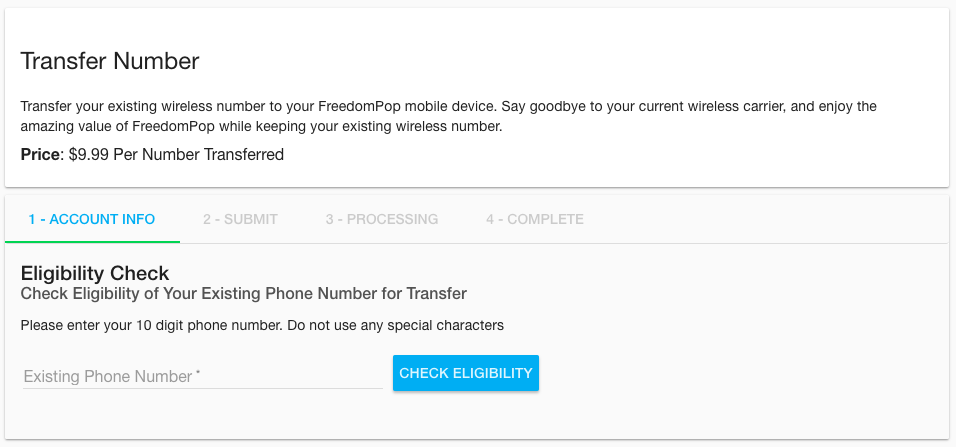
**Step 4:** If your phone number is eligible to be ported, you will be asked to provide your account information from your previous carrier.
**Step 5:** Fill in the billing information you have on file with your other carrier, then click Next.
**Step 6:** Click Submit to begin your port request.
**What happens now?**
The process typically takes 2-24 hours for mobile phone numbers and 5-7 days for landlines or VOIP numbers. Once the port-in process is complete you'll get an email from us to let you know your request was successful.
Once the port-in process is complete, your ported-in phone number will show up in the FreedomPop messaging application and online in your [my.freedompop.com](http://my.freedompop.com/) account. Your old number will be deactivated, and your ported-in number should now work.
Your phone may be unable to make or receive calls for a few minutes after the port-in process is complete. Text messaging may take up to 72 hours to work.
We recommend that you log out and log back into the FreedomPop app if your new phone number does not show up properly.
**If your ported-in phone number is not working**
If you are unable to make or receive calls or texts, even 72 hours after the port-in process was completed successfully, you may need to synchronize your FreedomPop account with your FreedomPop application and phone.
[Click here](https://help.freedompop.com/synchronize-account-data?hsLang=en) to learn how to synchronize the two, and resolve this problem.
- [About FreedomPop](https://help.freedompop.com/about-freedompop?hsLang=en)
- [Getting started](https://help.freedompop.com/getting-started?hsLang=en)
- [General](https://help.freedompop.com/general?hsLang=en)
- [Account Management](https://help.freedompop.com/account-management?hsLang=en)
- [Troubleshooting](https://help.freedompop.com/troubleshooting?hsLang=en)
- [eSIM](https://help.freedompop.com/esim?hsLang=en)
- [Number Transfer](https://help.freedompop.com/number-transfer?hsLang=en)
- [Rebate](https://help.freedompop.com/rebate?hsLang=en)
Copyright © 2026, FreedomPop