---
title: Find your MEID or IMEI (serial) number
description: This information applies to both Premium SIMs and older, Standard SIMs. What is an MEID number? Your MEID number is an identifier for your phone. No two devices have the same MEID number. The MEID is
---
[Skip to content](https://help.freedompop.com/find-your-meid-or-imei-serial-number#main-content)
[Contact us](https://help.freedompop.com/kb-tickets/new?hsLang=en)
[![FreedomPop-Logo.png\]](https://help.freedompop.com/hs-fs/hubfs/FreedomPop-Logo.png?height=40&name=FreedomPop-Logo.png)](https://www.freedompop.com/)
Open main navigation
Close main navigation
- [Contact us](https://help.freedompop.com/kb-tickets/new)
- [FreedomPop Help](https://help.freedompop.com/)
[FreedomPop Help](https://help.freedompop.com/?hsLang=en)
How Can We Help You?
- There are no suggestions because the search field is empty.
1. [FreedomPop Help Center](https://help.freedompop.com/?hsLang=en)
2. [Troubleshooting](https://help.freedompop.com/troubleshooting?hsLang=en)
# Find your MEID or IMEI (serial) number
**This information applies to both Premium SIMs and older, Standard SIMs.**
**What is an MEID number?**
Your MEID number is an identifier for your phone. No two devices have the same MEID number. The MEID is also called the ESN or serial number.
Some phones may not have an MEID, they may instead have a IMEI number. Both have the same purpose and function the same way. Below are a few easy methods for finding your personal IMEI or MEID number.
If this article resolves your problem, please select Yes, under the "Was this answer helpful?" section to the left of the page. If it could use improvement, please select " No". We appreciate your feedback!
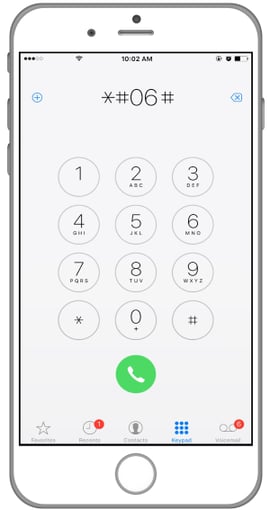
**Dial \*#06#**
This method works on nearly every phone. Complete the following steps:
**Step 1:** Tap the calling icon, it's in the image of a phone
**Step 2:** Dial \* then # then the number 0 then the number 6 and finally #
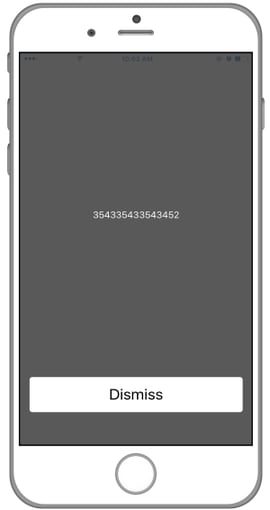
**Step 3:** The MEID or ICCID number will show up on the screen
**Step 4:** If you see a Not Registered error, please [contact us](https://premium.freedompop.com/contact-us).
**Check Your Settings**
Complete the following steps, if you have an **Android** device:
**Step 1:** Go to Settings
**Step 2:** Go to About Phone (you may have to scroll down to the bottom of the list)
**Step 3:** Go to Status
**Step 4:** Scroll down until you see your MEID or IMEI number. You can also see your ICCID or SIM card number from here.
[Contact us](https://premium.freedompop.com/contact-us) to have your ICCID number added to your account, if you cannot get an LTE connection. Your ICCID number is needed for this functionality.
**Complete the following steps, if you have an iPhone device:**
**Step 1:** Go to Settings
**Step 2:** Go to General
**Step 3:** Go to About
**Step 4:** Scroll down until you see your MEID or IMEI number
You can also see your ICCID or SIM card number from here. [Contact us](https://premium.freedompop.com/contact-us) to have the ICCID added to your account, if you do not get LTE connectivity. Your ICCID number is required for this functionality.
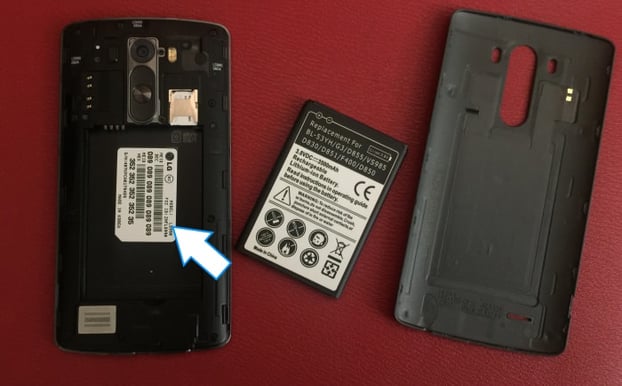
**Look under the battery**
Remove the back cover of the phone, and then remove the phone's battery. Underneath the battery, find the IMEI or HEX number (this is another name for the MEID number.
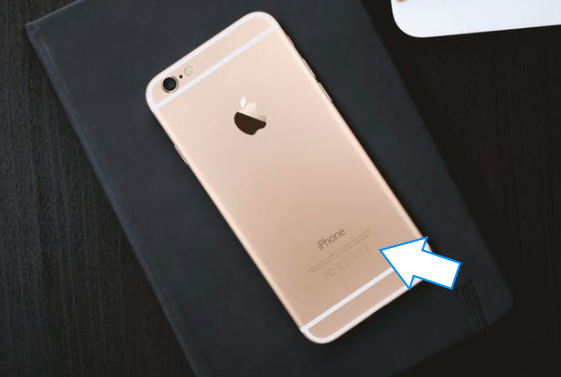
**Check the back of the phone**
**Attention! This applies only to iPhones.** The MEID or IMEI number is printed on the back of iPhones, in very small numbers.
- [About FreedomPop](https://help.freedompop.com/about-freedompop?hsLang=en)
- [Getting started](https://help.freedompop.com/getting-started?hsLang=en)
- [General](https://help.freedompop.com/general?hsLang=en)
- [Account Management](https://help.freedompop.com/account-management?hsLang=en)
- [Troubleshooting](https://help.freedompop.com/troubleshooting?hsLang=en)
- [eSIM](https://help.freedompop.com/esim?hsLang=en)
- [Number Transfer](https://help.freedompop.com/number-transfer?hsLang=en)
- [Rebate](https://help.freedompop.com/rebate?hsLang=en)
Copyright © 2026, FreedomPop