---
title: Suspended due to high usage
description: Your account has been suspended for unusually high data usage. To protect you from fraud and misuse, we've temporarily suspended your account. Please verify your usage and unsuspend your service by lo
---
[Skip to content](https://help.freedompop.com/suspended-due-to-high-usage#main-content)
[Contact us](https://help.freedompop.com/kb-tickets/new?hsLang=en)
[![FreedomPop-Logo.png\]](https://help.freedompop.com/hs-fs/hubfs/FreedomPop-Logo.png?height=40&name=FreedomPop-Logo.png)](https://www.freedompop.com/)
Open main navigation
Close main navigation
- [Contact us](https://help.freedompop.com/kb-tickets/new)
- [FreedomPop Help](https://help.freedompop.com/)
[FreedomPop Help](https://help.freedompop.com/?hsLang=en)
How Can We Help You?
- There are no suggestions because the search field is empty.
1. [FreedomPop Help Center](https://help.freedompop.com/?hsLang=en)
2. [Account Management](https://help.freedompop.com/account-management?hsLang=en)
# Suspended due to high usage
*\*\*\*This only applies if your SIM card number begins with 89011\*\*\** **Why your account is suspended**
Your account has been suspended for unusually *high* data *usage*. To protect you from fraud and misuse, we've temporarily suspended your account. Please verify your *usage* and unsuspend your service by logging into your account online.
**Note!** This article does not apply to accounts, that are suspended due to reaching the data limit. It only applies if you are suspended, but still, have over 100MBs of data available. Please [click here](https://help.freedompop.com/how-to-fix-account-problems?hsLang=en) to learn about other types of account suspensions.
**How to reactivate your account:**
**Step One:** Login at [my.freedompop.com](https://my.freedompop.com/).
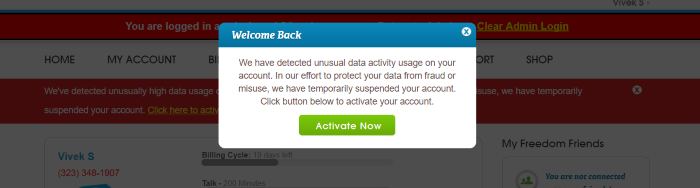
**Step Two:** You will see a pop up that informs you of the suspension. Click “Activate Now”.
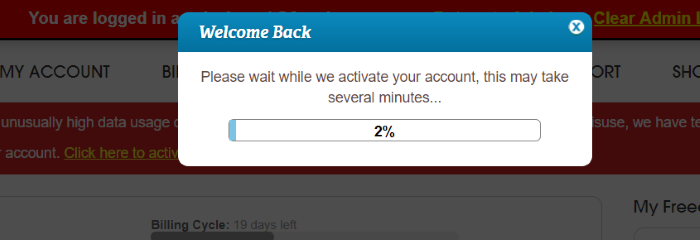
**Step Three:** Allow the service to reactivate. This may take a couple of minutes.
**Monitor your data *usage***
It’s a good idea to keep an eye on your data *usage*, to avoid unauthorized activity. Download the MyFreedomPop application to review your data *usage* details, or consider installing a data monitoring application from your App or Google Play store.
To report fraudulent activity on your account, or if you have any additional questions, [click here](https://help.freedompop.com/how-to-contact-freedompop?hsLang=en) to learn how to get in touch with us.
- [About FreedomPop](https://help.freedompop.com/about-freedompop?hsLang=en)
- [Getting started](https://help.freedompop.com/getting-started?hsLang=en)
- [General](https://help.freedompop.com/general?hsLang=en)
- [Account Management](https://help.freedompop.com/account-management?hsLang=en)
- [Troubleshooting](https://help.freedompop.com/troubleshooting?hsLang=en)
- [eSIM](https://help.freedompop.com/esim?hsLang=en)
- [Number Transfer](https://help.freedompop.com/number-transfer?hsLang=en)
- [Rebate](https://help.freedompop.com/rebate?hsLang=en)
Copyright © 2026, FreedomPop